
WhatsApp Is Giving Your Phone Numbers To Facebook. Here’s How You Can Stop It
Big changes are coming to WhatsApp.


 Cover image via Wordpress
Highly popular messaging app WhatsApp is facing some major changes and from the looks of it, it's not for the better.
The app announced in a blog post that it'll start sharing phone numbers and analytics data of its users with its parent company, Facebook.

Image via Giphy

What this means is that Facebook will investigate user activity and send you friend recommendations. Of course, more targeted ads will be coming your way too.

Image via Telegraph
Thankfully, there are ways to opt out of this predicament! But the period is only 30 days long, so you have to be quick. Here are the two options to go about it:
1. Carefully read the terms and conditions

Image via WhatsApp
When you update to the newest version of WhatsApp, you'll see a new set of terms and conditions. Once the app is done updating, the first screen in the process will come up. Don't tap Agree just yet! **Tap on Read instead.**
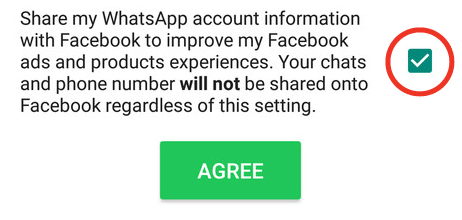
Image via WhatsApp
Scroll all the way down and **uncheck** the box that will share your WhatsApp info with Facebook
2. Head to your WhatsApp settings
The second method applies if you've already accepted the new terms and conditions without having first opted out.
**Go to Settings – Account – Share my account info from inside the app.** At the bottom of this screen is a checkbox that you can **uncheck** to prevent the app from sending information to Facebook.
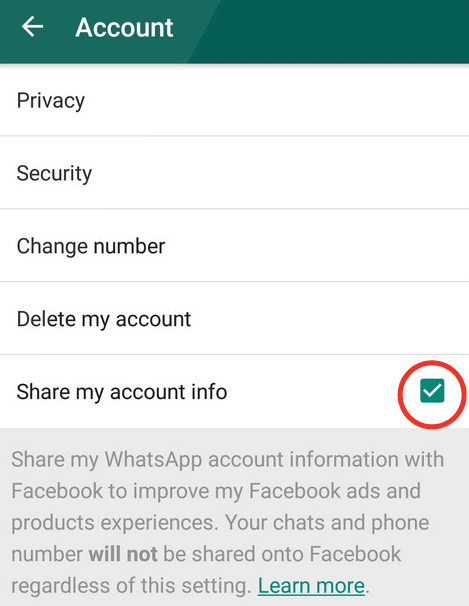
Image via WhatsApp
And there you have it! These two options should ensure that your phone number isn't shared with Facebook, and the rest of your personal data should be safe as well.

Image via GIphy
A good reminder that we should always, ALWAYS read the T&Cs. 🙂
