
How To Book A Klinik Kesihatan Appointment Via MySejahtera: A Complete Step-By-Step Guide
And other useful FAQs about scheduling your visit.


Follow us on Instagram, TikTok, and WhatsApp for the latest stories and breaking news.
Booking a Klinik Kesihatan appointment via MySejahtera is done through the Janji Temu (Appointment) feature in the MySejahtera app, which is available on iOS and Android
The feature allows eligible users to book appointments at Ministry of Health (MOH) facilities, including Klinik Kesihatan, by selecting an available service, clinic, date, and time slot.
Users aged 18 and above can also make appointments on behalf of their registered dependants.
But remember: The feature is intended for planned healthcare visits only. If you have a medical emergency, go to the nearest healthcare facility instead of waiting for an appointment, as patients will be treated based on the urgency of their condition.
What is the MySejahtera Klinik Kesihatan appointment feature?
The MySejahtera Klinik Kesihatan appointment feature is part of the app's Janji Temu function, allowing users to book appointments for health services at Ministry of Health facilities.
This means you can make an appointment instead of relying only on walk-in registration. Since 1 January 2023, Klinik Kesihatan services under KKM have been made bookable as appointments through MySejahtera.
This is especially useful for outpatient care, health screenings, dental checks, pre-marital screening, family planning, smoking cessation support, and selected procedures where appointment slots are available.
Who can book a Klinik Kesihatan appointment on MySejahtera?
The Janji Temu feature can be used by MySejahtera users aged 18 years and above, including on behalf of dependents who require health services.
This means an adult MySejahtera account holder may book for themselves or for a dependent profile in the app.
Before booking, make sure the relevant profile details are updated because MySejahtera advises users to keep the app and important details updated to support smooth registration and verification at the facility.
Note: Instead of booking through MySejahtera, calling a clinic directly may still be useful if you are unsure which service category to choose, need document clarification, expect to be late, or have a case that may require urgent attention.
Also, you shouldn't rely on MySejahtera appointment booking for emergencies. For urgent symptoms, serious pain, breathing difficulty, heavy bleeding, severe injury, or other emergency concerns, go directly to a nearby health facility for triage and care.
How do you book a Klinik Kesihatan appointment via MySejahtera?
To book a Klinik Kesihatan appointment through MySejahtera, open the app, go to Janji Temu, select the correct user or dependent, choose the service, search for a suitable facility, pick an available date and time, then confirm the booking.
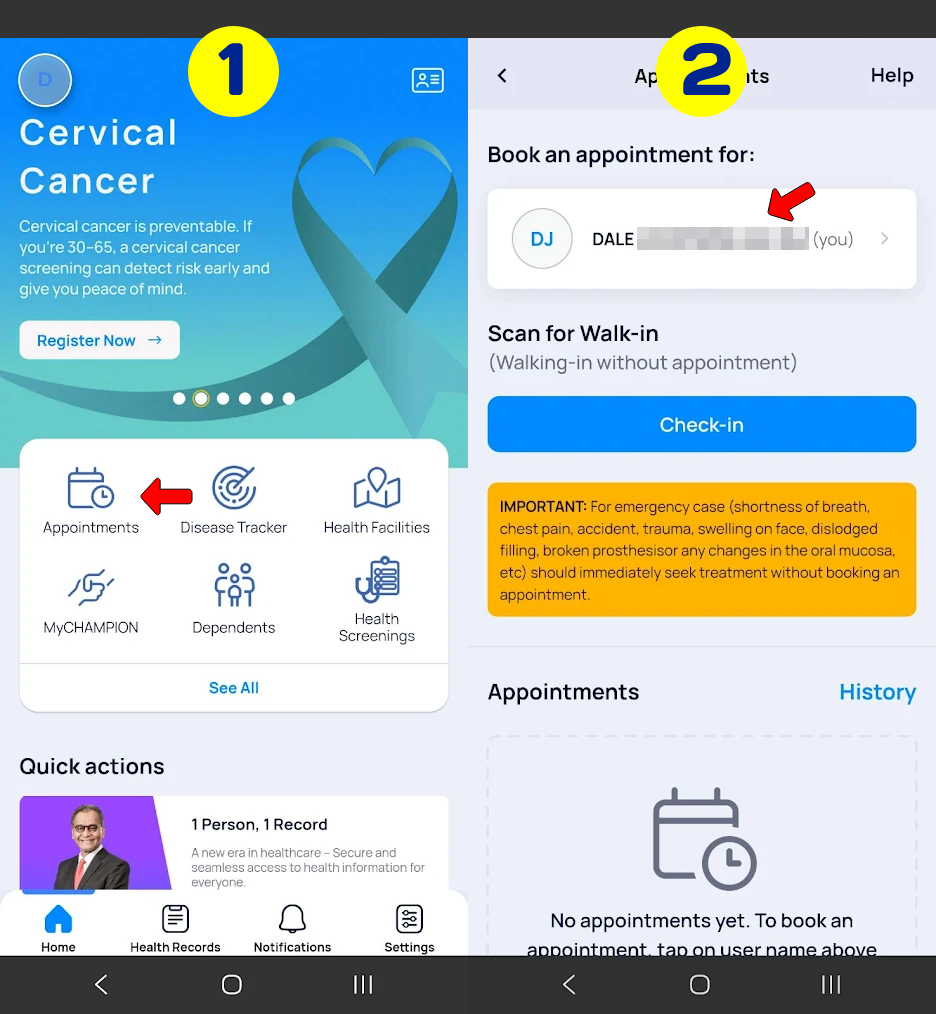
STEP 1: Open the MySejahtera app
STEP 2: Tap Janji Temu (BM) or Appointments (English)
STEP 3: Select the user profile (yourself or co-dependent who needs the appointment)
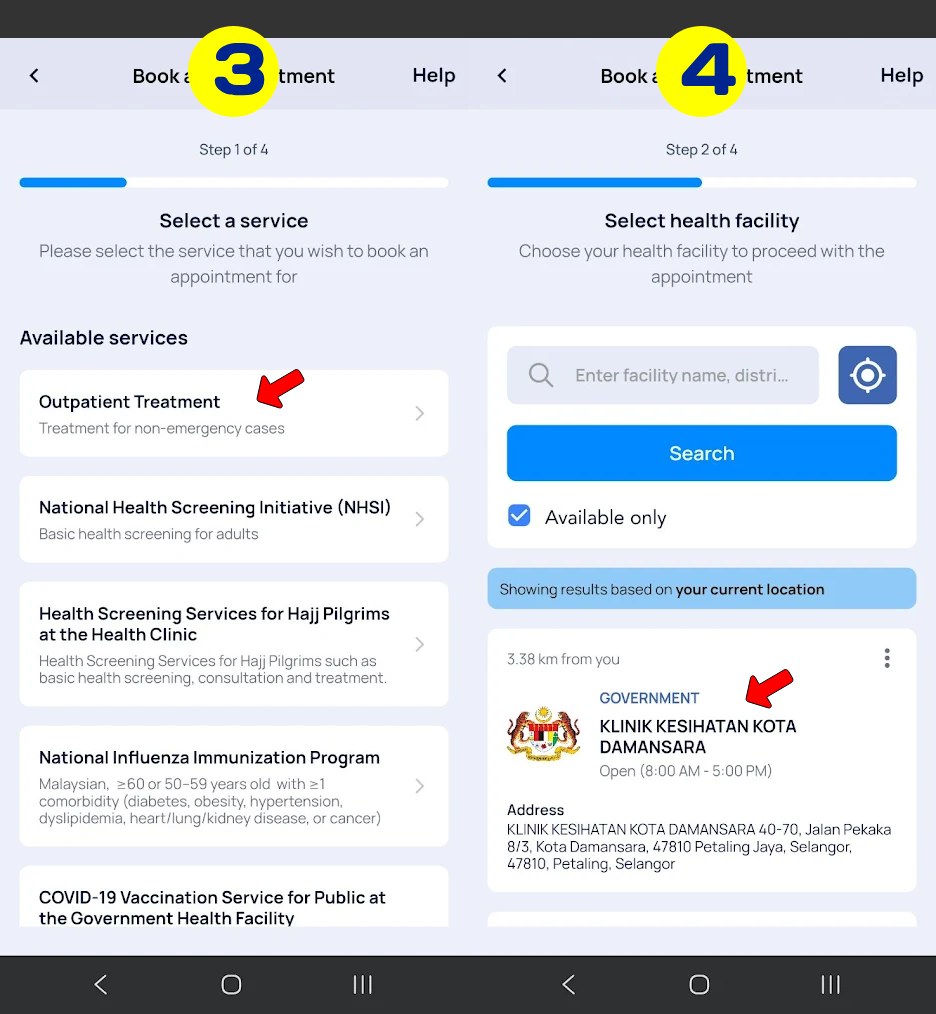
STEP 4: Choose the service you want, such as outpatient treatment, dental check-up, influenza immunisation, B40 health screening, etc
STEP 5: Search for and select a Klinik Kesihatan by location
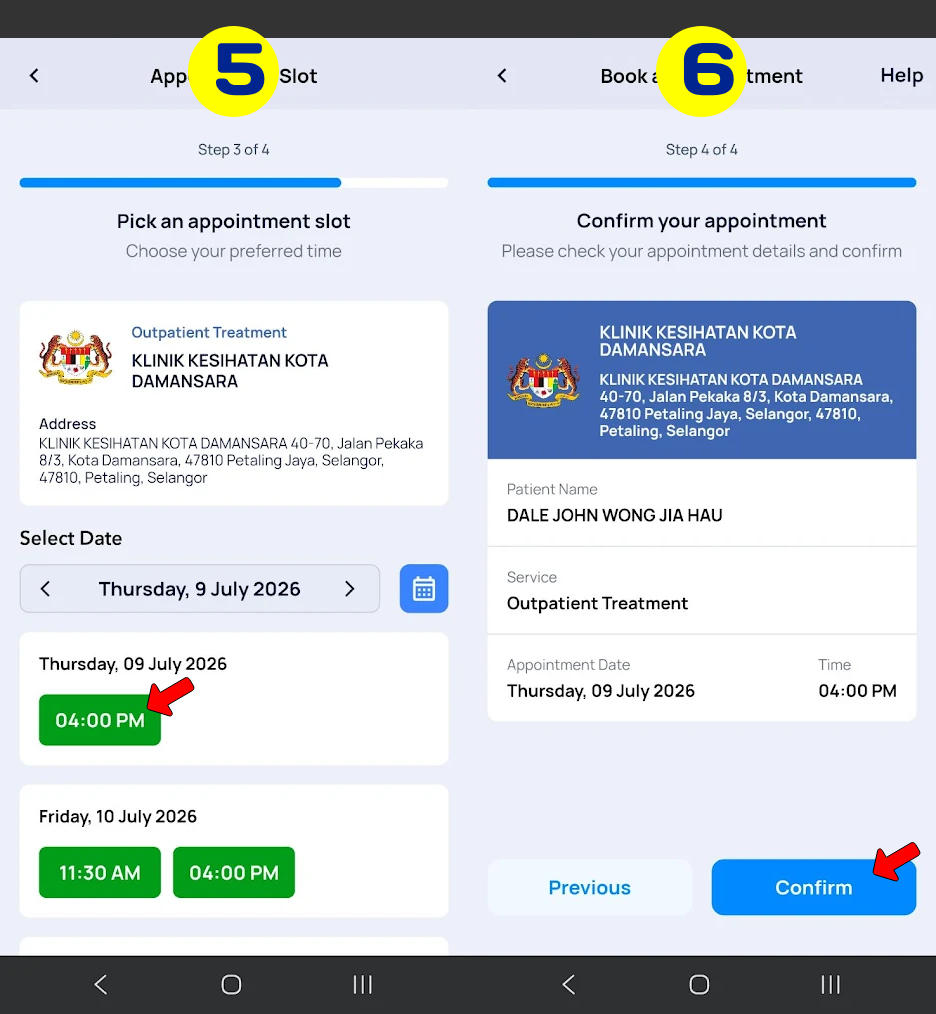
STEP 6: Choose your appointment based on available slots
STEP 7: Review the details, including location, date, time and patient name
STEP 8: Confirm the appointment and ensure it appears under your upcoming appointments
Things to keep in mind:
– You can only book one appointment slot for one service at a time. To make a different appointment, you may need to cancel or reschedule the existing booking.
– Arrive at least 30 minutes before your appointment slot. This gives enough time for registration, identity checks, and clinic routing.
So, what services can you book at Klinik Kesihatan via MySejahtera?
MySejahtera lists several health services that can be booked through the Janji Temu function.
Availability depends on the selected facility, so not every Klinik Kesihatan will display every service.
| Service in MySejahtera | What it is usually for |
|---|---|
| Rawatan Pesakit Luar | General outpatient treatment for non-emergency health concerns |
| Inisiatif Saringan Kesihatan Kebangsaan | National health screening appointments |
| Saringan Kesihatan PeKa B40 | Health screening for eligible PeKa B40 recipients |
| Pemeriksaan Kesihatan Bakal Jemaah Haji di Klinik Kesihatan | Health checks for prospective Hajj pilgrims |
| Pemeriksaan Kesihatan Pra-Pekerjaan/Pengajian | Medical checks for employment or study requirements |
| Saringan Pra-Perkahwinan | Pre-marital health screening |
| Khidmat Berhenti Merokok | Smoking cessation support |
| Perkhidmatan Perancang Keluarga | Family planning consultation and services |
| Prosedur | Selected procedures, depending on facility availability |
| Imunisasi Catch-Up Pneumokokal | Catch-up pneumococcal immunisation, where available |
| Perkhidmatan Kesihatan Seksual | Sexual health services |
| Pemeriksaan Kesihatan Pergigian | Dental health examination |
The most important point is that not every Klinik Kesihatan will show every service. MySejahtera states that users may book at MOH health facilities based on the services provided by that facility.
How do you choose the right Klinik Kesihatan in MySejahtera?
Choose a Klinik Kesihatan based on the service you need, distance from your location, and available appointment slots. MySejahtera lets users search for facilities after selecting the customer name and service, using the facility name, place, or postcode.
The best clinic is not always the nearest one. For example, one Klinik Kesihatan may show outpatient slots but not dental appointments, while another nearby facility may offer dental checks, pre-marital screening, or specific procedures.
Before confirming, check four details carefully: the selected patient profile, service category, clinic location, and appointment time. This reduces the risk of arriving at the wrong clinic or booking a service that does not match your actual visit.
What should you prepare before attending your Klinik Kesihatan appointment?
Before attending your appointment, prepare your identification document, appointment details in MySejahtera, and any relevant medical or screening documents. You should also make sure the app is updated and accessible on your phone.
| Item to prepare | Why it matters |
|---|---|
| MyKad or passport | Needed for identity verification |
| MySejahtera appointment details | Helps staff confirm your booking |
| Medical records or referral documents | Useful for follow-up treatment or specific health concerns |
| Screening forms, if applicable | May be needed for screening-related appointments |
| Updated MySejahtera app | Helps avoid registration or verification issues |
Users are advised to arrive at least 30 minutes before the appointment slot to support a smoother registration process.
What happens when you arrive at Klinik Kesihatan for your appointment?
When you arrive, go to the registration or appointment counter and show your appointment details in MySejahtera when requested. Clinic staff may verify your identity, check your appointment category, and direct you to the relevant service area.
Even with an appointment, there may still be waiting time depending on patient load, triage needs, staff availability, and service type. Appointments help organise visits, but they do not always guarantee immediate consultation at the exact booked time.
Can you cancel or reschedule a MySejahtera Klinik Kesihatan appointment?
Yes. MySejahtera allows users to cancel or reschedule appointments. They can also book one appointment slot for one service at a time and may use the cancel or reschedule option to make a new appointment.
If you cannot attend, cancel or reschedule the appointment early. This avoids losing the slot and may allow another user to book the same time. If you expect to be late, the safer option is to contact the facility where possible, cancel the appointment, or book a new slot.
What if you are late for your Klinik Kesihatan appointment?
If you are late, the facility may not be able to accept you under the original appointment slot. MySejahtera advises users to arrive at least 30 minutes before the booked time to ensure a smooth process.
The practical rule is to treat the appointment time seriously. If you know you cannot arrive on time, reschedule instead of assuming the clinic can still process your visit later in the day.
Can you walk in to Klinik Kesihatan without a MySejahtera appointment?
For emergencies, yes. MySejahtera states that users may go to a nearby health facility for the required treatment or service during an emergency. However, walk-in attendance and registration without an appointment are subject to triage and the discretion of the health facility.
For non-emergency cases, booking through MySejahtera is recommended where possible. This helps you secure a slot and reduces the chance of unnecessary waiting, crowding, or being asked to return on another day.
How much does a Klinik Kesihatan appointment via MySejahtera cost?
Making an appointment through MySejahtera does not necessarily mean the service itself is free.
MySejahtera Helpdesk states that services after an appointment may involve charges depending on the scope of service and premises. Treatment at government Klinik Kesihatan is subject to the Fees Act 1951, while private premises follow their own charges and policies.
For most users, the appointment function is mainly a booking channel. Any applicable payment depends on the service type, patient category, and government healthcare fee rules.
FAQs about booking a Klinik Kesihatan appointment via MySejahtera
Can I choose any Klinik Kesihatan in MySejahtera?
You can choose from the Klinik Kesihatan locations shown in MySejahtera, as long as the facility offers the service you need and has an available slot. You are generally not restricted to only one assigned clinic.
Why does my preferred Klinik Kesihatan not appear in MySejahtera?
It may not appear because the selected service is not available there, there are no current slots, or the search area does not match the facility. Try searching by facility name, place, or postcode.
Can I book for my child or dependent?
Yes. Adult MySejahtera users can book appointments for dependents registered under their account. Make sure the correct dependent profile is selected before confirming the appointment.
Can I book more than one appointment at the same time?
MySejahtera states that users can book one appointment slot for one service only at a time. To make another appointment, use the cancel or reschedule option where applicable.
What should I bring to Klinik Kesihatan?
Bring your MyKad or passport, your appointment details in MySejahtera, and any relevant medical records, referral letters, or screening forms related to your visit.
Can I walk in without an appointment?
For emergencies, you may go directly to a nearby health facility. Walk-in registration without an appointment is subject to triage and facility discretion.
Does MySejahtera show all Klinik Kesihatan in Malaysia?
MySejahtera shows facilities relevant to the selected service and search input. After choosing the customer and service, users can search for facilities using facility name, place, or postcode.
Is the MySejahtera appointment free?
Booking an appointment through MySejahtera does not necessarily determine the treatment fee. Service charges may depend on the type of service, patient category, and applicable government healthcare fee rules.
