
How To Check If You Are Registered To Vote In Malaysia
Automatic registration in Malaysia doesn't mean your record appears immediately when you turn 18, or that your voting area changes when you move.


 Cover image via SAYS
You can check whether you are registered to vote in Malaysia through MySPR Semak, the official checking service operated by the Election Commission (EC), or Suruhanjaya Pilihan Raya Malaysia (SPR).
Enter your MyKad number without dashes or spaces, complete the CAPTCHA and submit your check.
Whether you are a first-time voter or have voted before, check that your personal details and registered voting area are correct. During an election, you should also recheck your assigned polling arrangements.
How do I check my voter registration online?

STEP 1: Open the official MySPR Semak voter-checking page, labelled Semakan Daftar Pemilih.
STEP 2: Enter your MyKad number without dashes or spaces. Military and police personnel can use the service-number formats shown on the form.
STEP 3: Enter the CAPTCHA characters displayed.
STEP 4: Submit the check and review the information returned.
You can use the public checking form without signing in to a MySPR account.
Don't have a MySPR account yet? Here's how to register for the first time:
Even if you are a registered voter, you'll need to open a MySPR account for online voter services and voter-related applications:
- Go to MySPR and click Permohonan Akaun Baharu, or new account application.
- Fill in your details according to your MyKad, including your MyKad number, mobile number, email address, password, security question, and address.
- Upload a clear photo of the front of your MyKad.
- Upload a clear selfie of yourself holding your MyKad.
- Enter the CAPTCHA, check your details, and submit the application.
ㅤ
After you submit your MySPR account application, it will be reviewed before the account is activated. Opening a new MySPR account typically takes around 1 to 3 working days, but this may take longer during busy election periods or if your uploaded MyKad images are unclear.
What details should I check in my voter record?
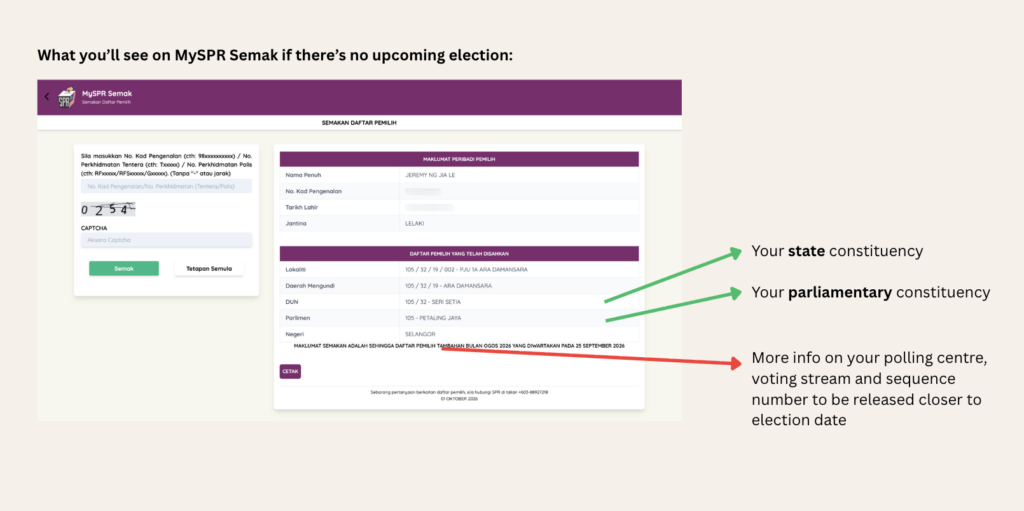
What you'll see on MySPR Semak if there's no upcoming election.
Image via SAYSCheck your personal information and the electoral areas listed for you. Your constituency determines which seat you vote for; your polling centre tells you where to go.
| Detail | What it means |
|---|---|
| Personal information | Check that the identifying details shown belong to you and are correct |
| Parliamentary constituency | The federal seat for which you elect a Member of Parliament |
| State constituency, or DUN | The state seat for which you elect a State Assemblyperson, where applicable |
| Polling district, or daerah mengundi | A smaller electoral area within your constituency; it is not the name of your polling venue |
When the EC releases polling details for an election involving your constituency, also check:
| Polling detail | What to look for |
|---|---|
| Polling centre, or pusat mengundi | The venue where you are assigned to vote |
| Voting stream, or saluran | Your assigned voting room or stream within the centre |
| Sequence number, or nombor bilangan | Your number in the relevant voter list |
| Recommended voting time | The suggested time to arrive, where provided |
| Polling date and hours | The date and opening hours applicable to your polling centre |
Registration information and election-day arrangements are different. If polling details have not been released, their absence does not by itself mean you are unregistered.
Save your current polling details when available, and check again before voting rather than relying on information from a previous election.
Am I automatically registered to vote when I turn 18?

Eligible Malaysian citizens aged 18 and above are registered automatically, subject to the legal eligibility requirements. Automatic voter registration took effect on 15 December 2021.
The EC's registration guidance explains that registration uses information supplied by the National Registration Department (JPN), including residential address records.
New voters are certified through monthly supplementary voter rolls. Your record may therefore not appear immediately on your 18th birthday.
Check the EC's announcement for the relevant monthly roll rather than assuming your registration will appear on a fixed date.
What should I do if my name does not appear in MySPR Semak?
First, check your identification number and try again. A failed check alone does not explain why your record is missing.
If the problem continues, consider these situations:
| Situation | What to do |
|---|---|
| You recently turned 18 | Check whether the supplementary roll covering your registration has been published |
| Your official address information is incomplete | Ask the EC whether your record requires clarification or an update with JPN |
| You believe you should already be registered | Contact the EC to investigate rather than repeatedly waiting for another update |
If your name still does not appear or you need help with your voter record, contact the Election Commission (EC) at 03-8892 7200 during office hours. You can also use the official enquiry channels listed on the MySPR Semak homepage.
What if my voter details are incorrect?
An error in your record and a request to move your voting area require different action.
If your name or other personal information is wrong, contact the EC for correction. Its guidance provides several correction channels, including written complaints and enquiries.
If your voting area still reflects an old residential address, follow the electoral-division transfer process instead.
If your name is missing or your information is incorrect in a newly published supplementary voter roll, you may be eligible to submit a claim using Form C during the specified checking period. Check the relevant EC notice to confirm whether your situation qualifies and the deadline for submitting your claim.
Why is my voting area different from where I live now?
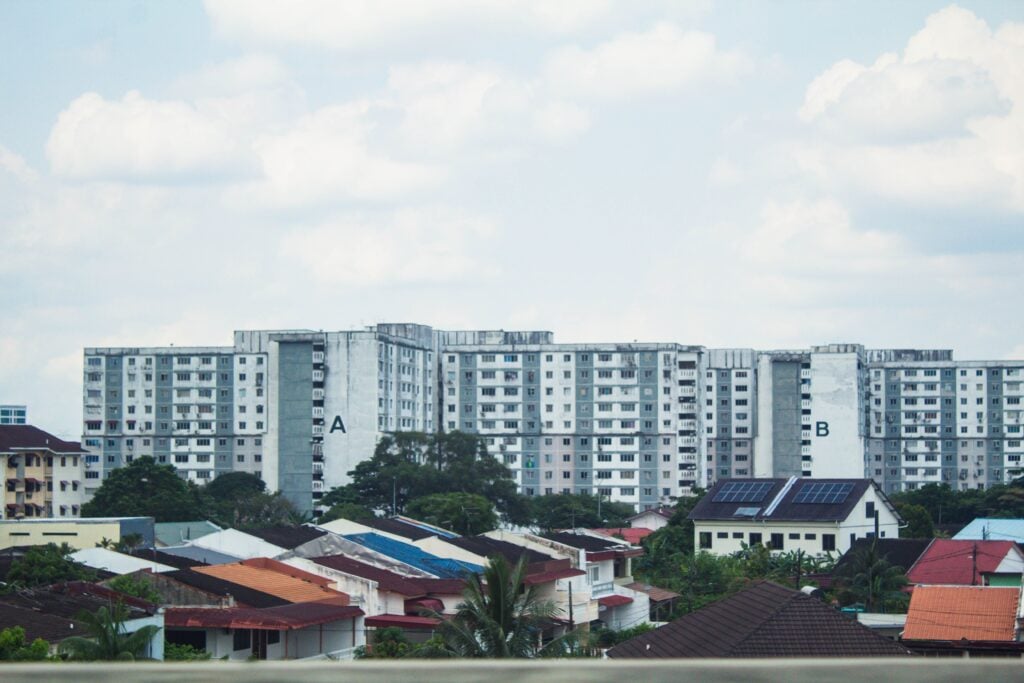
Moving home does not by itself transfer your existing voter registration to a new constituency.
If you now work, study or rent elsewhere, your voter record may still reflect your previous registered address.
The EC says voters seeking a transfer should first update their residential address with JPN, then apply to change their electoral division. Online applications are available through MySPR.
Submitting an application does not mean the change is already effective. Recheck your voter record after processing and confirm the arrangements that apply to the upcoming election.
What is the difference between MySPR Semak and MySPR?
MySPR Semak is for checking information; MySPR handles account-based applications.
| Platform | Main uses |
|---|---|
| MySPR Semak | Checking voter information, election candidates and election results |
| MySPR | Applications such as changing your electoral division |
For a straightforward registration check, use MySPR Semak.
Frequently asked questions
I have never registered or voted before. Should I still check?
Yes. Eligible citizens can be registered automatically even if they have never submitted a registration application or voted in an election. Check MySPR Semak to see your record.
Can I check my voter status without downloading an app?
Yes. You can use the MySPR Semak website through your phone or computer browser. Downloading an app is not necessary for the online check.
Can I choose a polling centre closer to my workplace or university?
You cannot select a different polling centre through MySPR Semak. Follow the centre assigned to your voter record for that election. If you have moved and want to transfer your voting area, use the separate electoral-division change process.
Why does my constituency name differ from my town or postal address?
Electoral boundaries do not necessarily match town names or postal areas. A different constituency name does not automatically indicate an error. If the placement appears wrong, ask the EC to check it.
Why is there no DUN seat in my voter information?
Voters registered in Kuala Lumpur, Putrajaya and Labuan do not elect state assembly representatives because the Federal Territories do not have State Legislative Assemblies.
If you are registered elsewhere and an expected field is missing, seek clarification from the EC.
Must I vote at the recommended voting time?
The recommended time is a suggestion, rather than a compulsory appointment. You must still vote within your polling centre's officially announced opening hours.
Does my sequence number tell me when to arrive?
No. Your sequence number identifies your entry in the relevant voter list. It is separate from the recommended voting time and your saluran number.
What if MySPR Semak will not load or the CAPTCHA fails?
Refresh the page and enter the newly displayed CAPTCHA. If the website remains unavailable, try again later or contact the EC through its official enquiry channels.
A technical error does not establish that you are missing from the voter roll.
Can I check election candidates and results on MySPR Semak too?
Yes. The homepage has separate sections for candidate checks and election results. These are distinct from the voter-registration check; the information available depends on the election and what the EC has published.
Last updated: 1 Oct 2026
