
Here’s The Ultimate Step-By-Step Guide To Filing Your Taxes For Beginners In 2026
The last day to file your income tax via e-Filing is 15 May 2026.


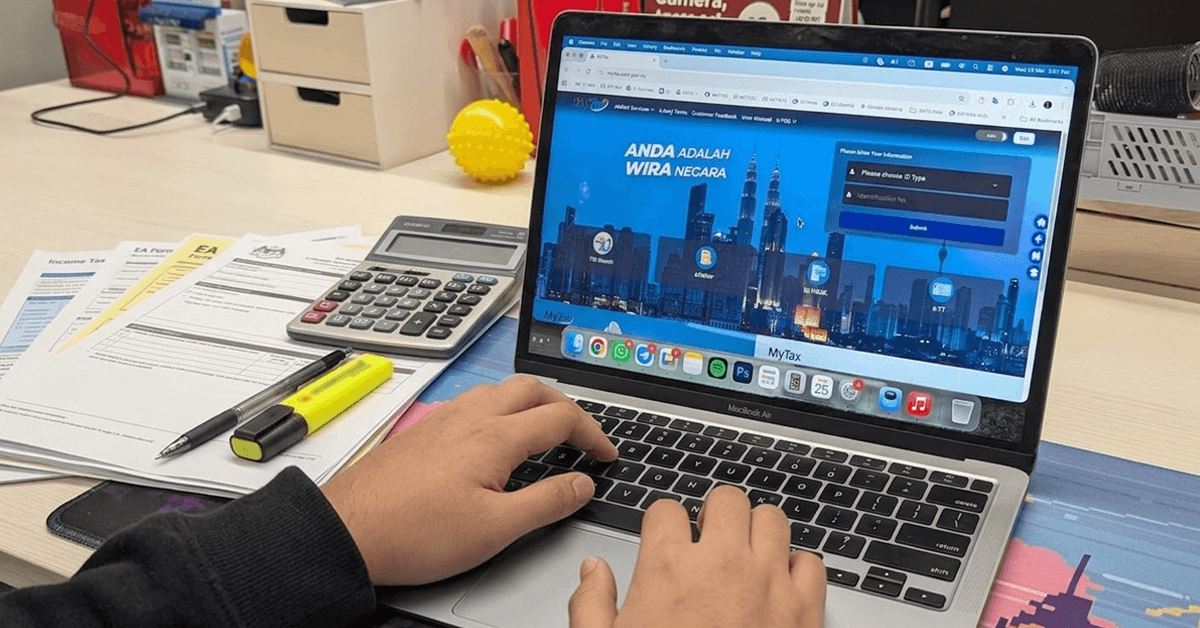 Cover image via SAYS
Follow us on Instagram, TikTok, and WhatsApp for the latest stories and breaking news.
The income tax season is upon us, and if you're a first-time taxpayer, the deadline might feel like a countdown
But don't worry, this guide is designed for you, the young Malaysian adult, the salaried employee, or anyone new to this process.
Although the official deadline falls at the end of April, those filing under e-BE — which stands for 'individual without a business source of income' — and submitting online are given an extended deadline until 15 May 2026.

An Inland Revenue Board (LHDN) office in Petaling Jaya, Selangor.
Image via SAYSFirst, do you even need to file?
You are legally required to file your income tax if your annual employment income is more than RM37,333 (after EPF deduction), or approximately RM3,111 per month.
Beyond salaried employees, you must also file if you are a:
• Gig economy worker: This includes self-employed individuals such as e-hailing drivers, food delivery riders, influencers, or freelancers whose income exceeds the taxable threshold.
• Business owner: Anyone with a registered business in Malaysia.
• TIN holder: If you have been issued a TIN and received a notice from the Inland Revenue Board (LHDN), you must file a return, even with no income.
Unsure if you need to file? You can check your eligibility using the official LHDN income tax calculator on the MyTax portal here.
What documents do I need?
• EA form(s) from the compan(ies) you worked for last year
• A relatively updated computer device, including both the operating system and browser
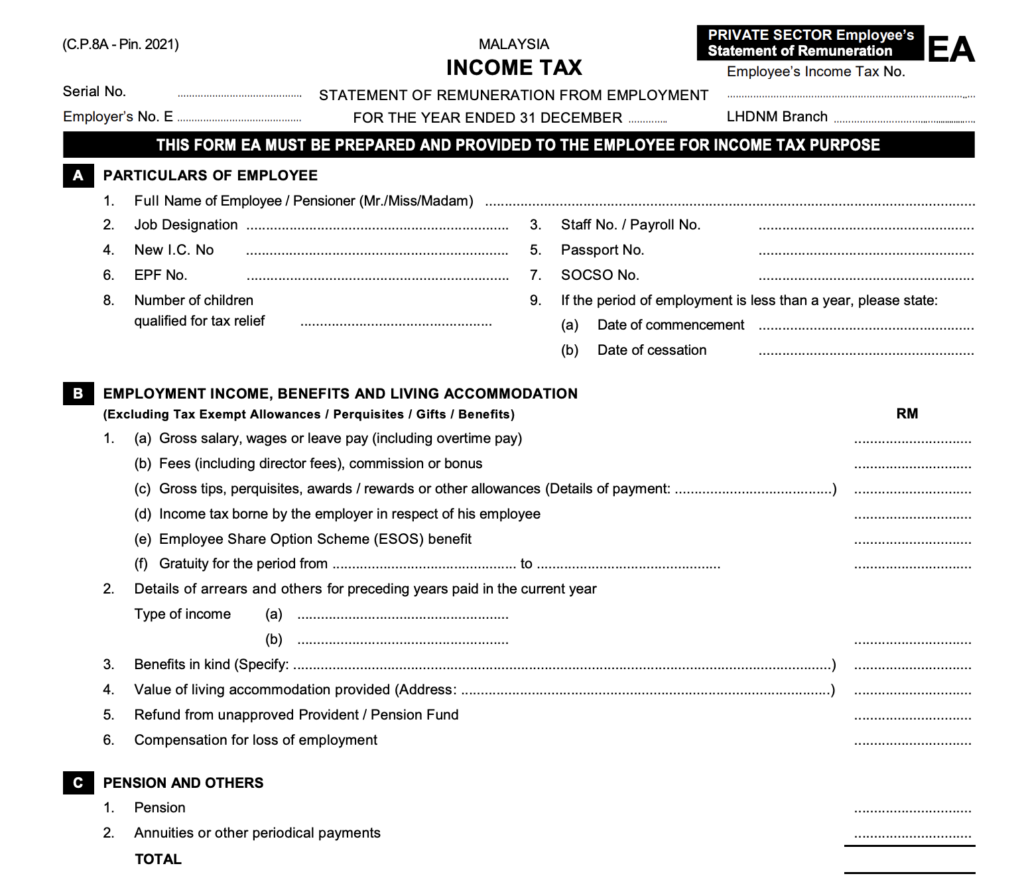
An EA form.
Image via LHDNThat said, some of you may not be able to complete the task in one sitting if you do not have the EA form from the previous company you worked at last year.
Every employer is legally bound to provide you with an EA form even if you have already left the company the following year. If they fail to produce an EA form for you, they are chargeable under Section 83(1A) of the Income Tax Act 1967.
Therefore, you are advised to contact your former employer as soon as possible.
What happens if you don't file your income tax?
Skipping your tax obligations can lead to serious consequences.
According to Section 112(1) of the Income Tax Act 1967, an individual can be imprisoned for up to six months or fined up to RM20,000, or both, for failing to furnish an income tax return form.
If you submit late within the first 60 days, you will be required to pay a 10% penalty on the tax payable. Further delays will incur additional penalties.
You are liable to file your income tax if you make more than RM37,333 annually, after the Employees Provident Fund (EPF) deduction.
While there is no specific requirement to file for those who do not make more than RM37,333 (after EPF deduction), it is still best practice to do so.
If you are an employee whose salary is already subject to Monthly Tax Deductions (MTD, or Potongan Cukai Bulanan – PCB), treat this as your final tax
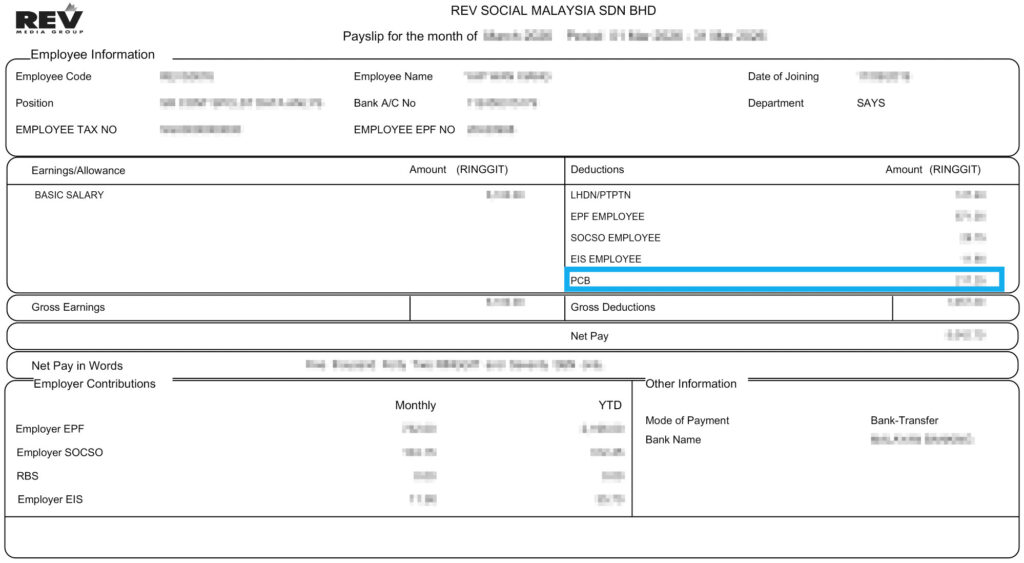
An example of a payslip with a Monthly Tax Deduction (MTD/PCB).
Image via SAYSThis means you would not need to file an Income Tax Return Form (ITRF).
However, if you choose not to file, you cannot claim any additional tax reliefs or refunds. To take advantage of tax reliefs (for lifestyle, medical, education, etc.), you must file your ITRF before the deadline.
As of 1 March 2026, your MyKad, MyPR, or MyKAS identification number now officially serves as your single Tax Identification Number (TIN).
This means you no longer need to remember a separate tax file number.
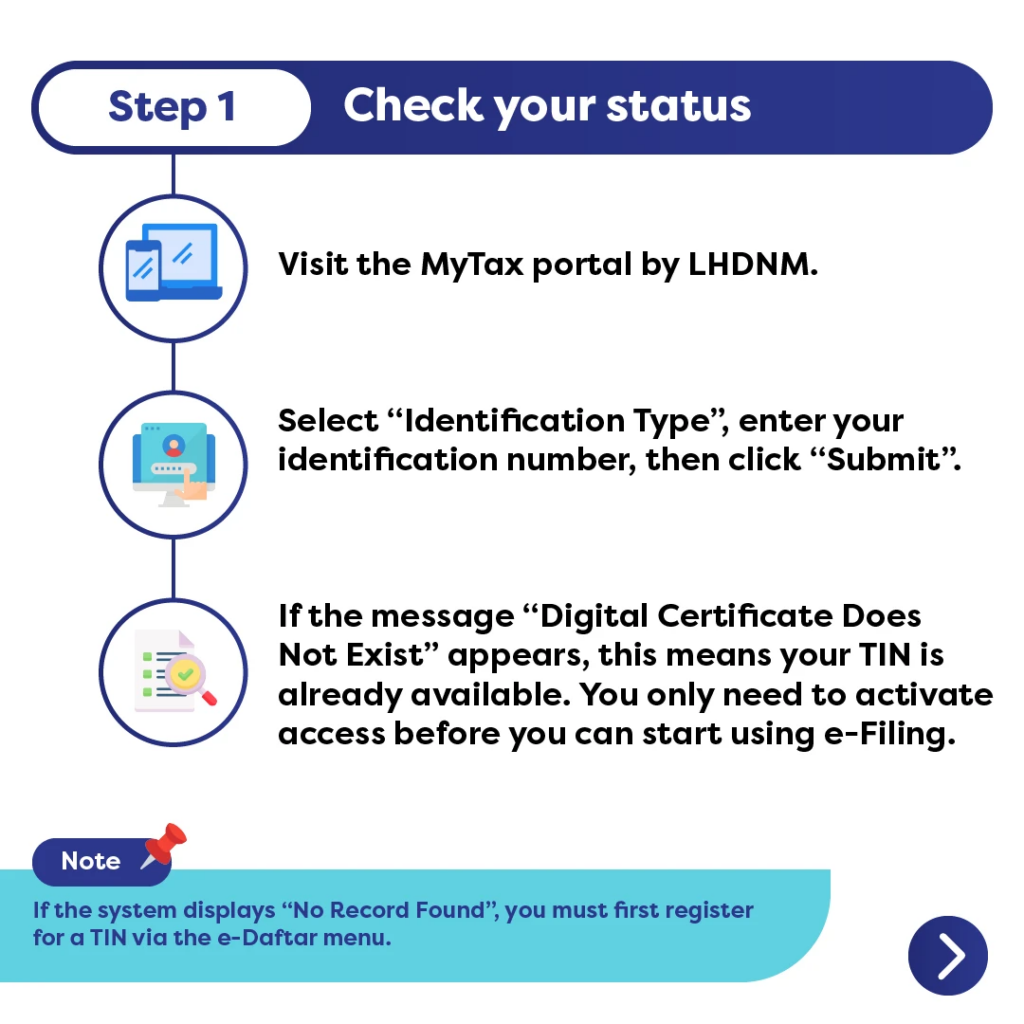
However, having a TIN doesn't automatically mean you can log into MyTax.
If this is your first time filing, you must first activate your Digital Certificate. This is a crucial security step before you can access the MyTax portal and start e-Filing.
Below are the steps:
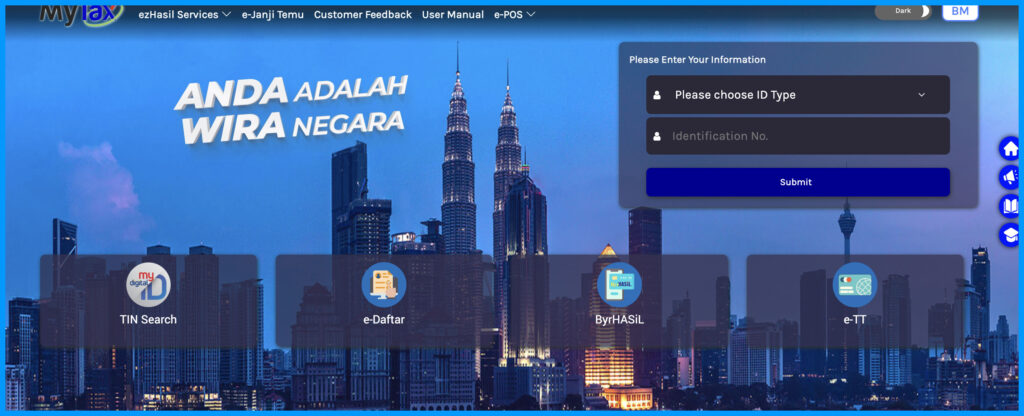
1. Visit the MyTax website here, type in your MyKad number and hit 'Submit'.
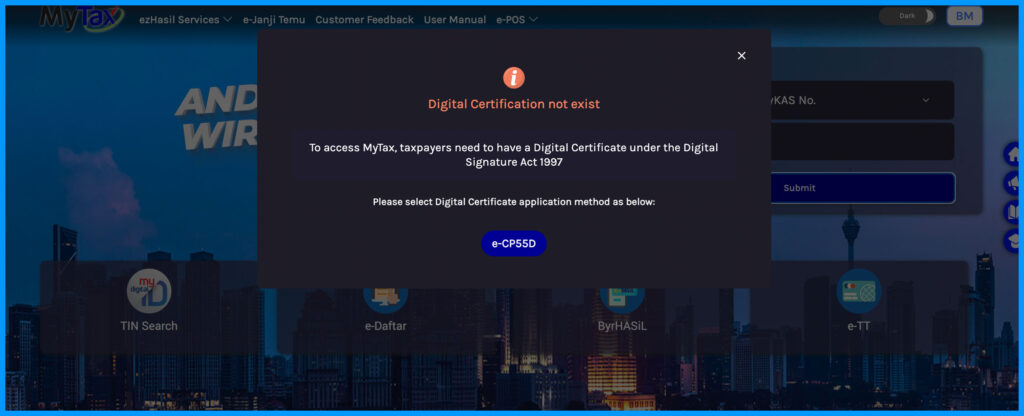
2. If the pop-up message says 'Digital Certification not exist', click the e-CP55D button, an online method for first-time Malaysian taxpayers to apply for a digital certificate (PIN).
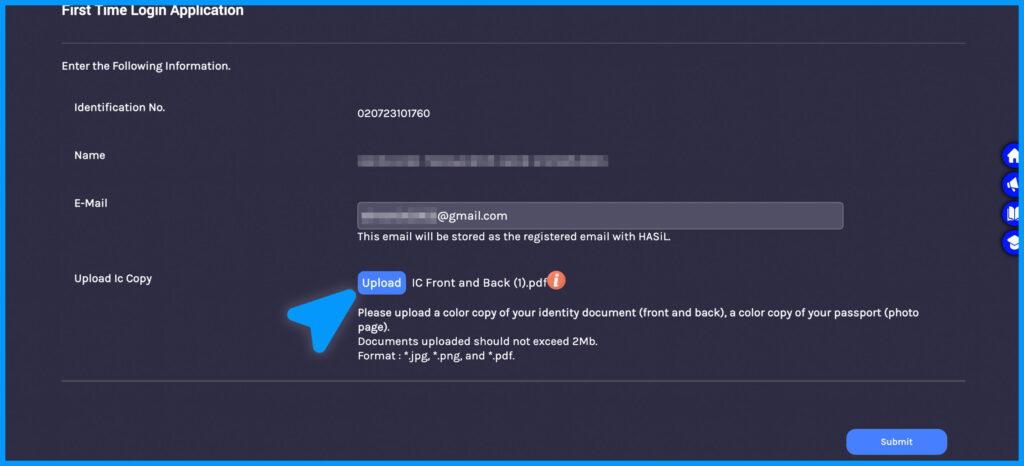
3. Enter your primary email, upload a photo of your MyKad (both front and back views), and click 'Submit'.
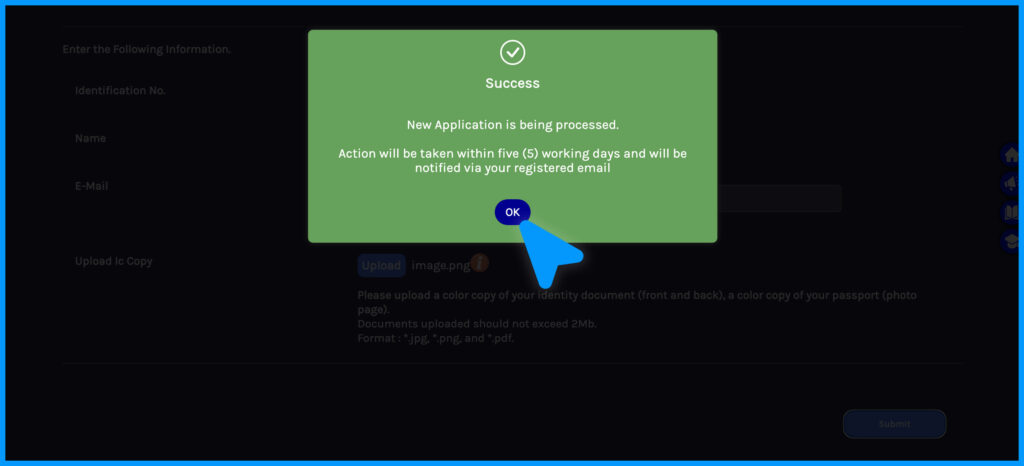
4. You will receive a notification in your email within five working days once your Digital Certificate has been successfully activated.
5. Click the link in your email and create your password and security phrase. Your MyTax account has been activated.
If you want a quicker registration, you can download the MyTax app here and scan your face and MyKad to activate access instantly. The steps are similar to those on a computer browser.
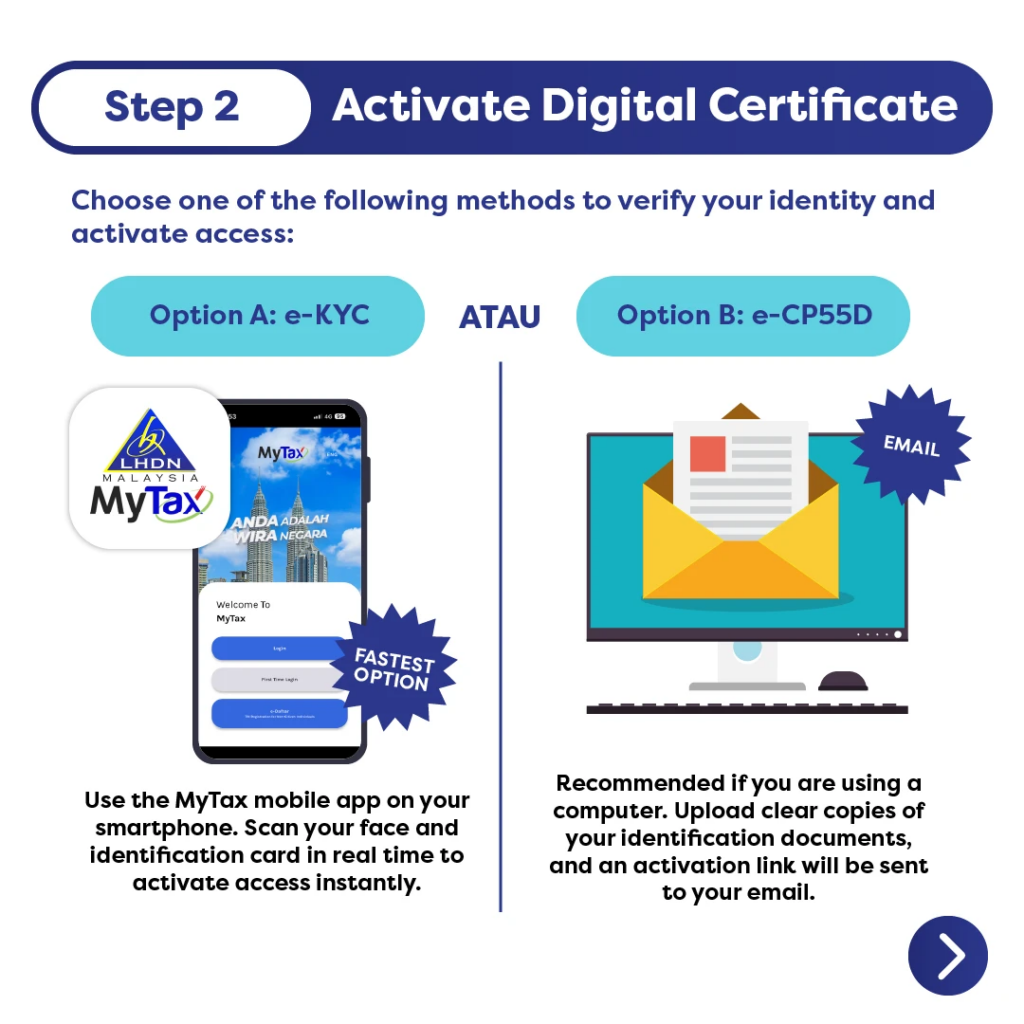
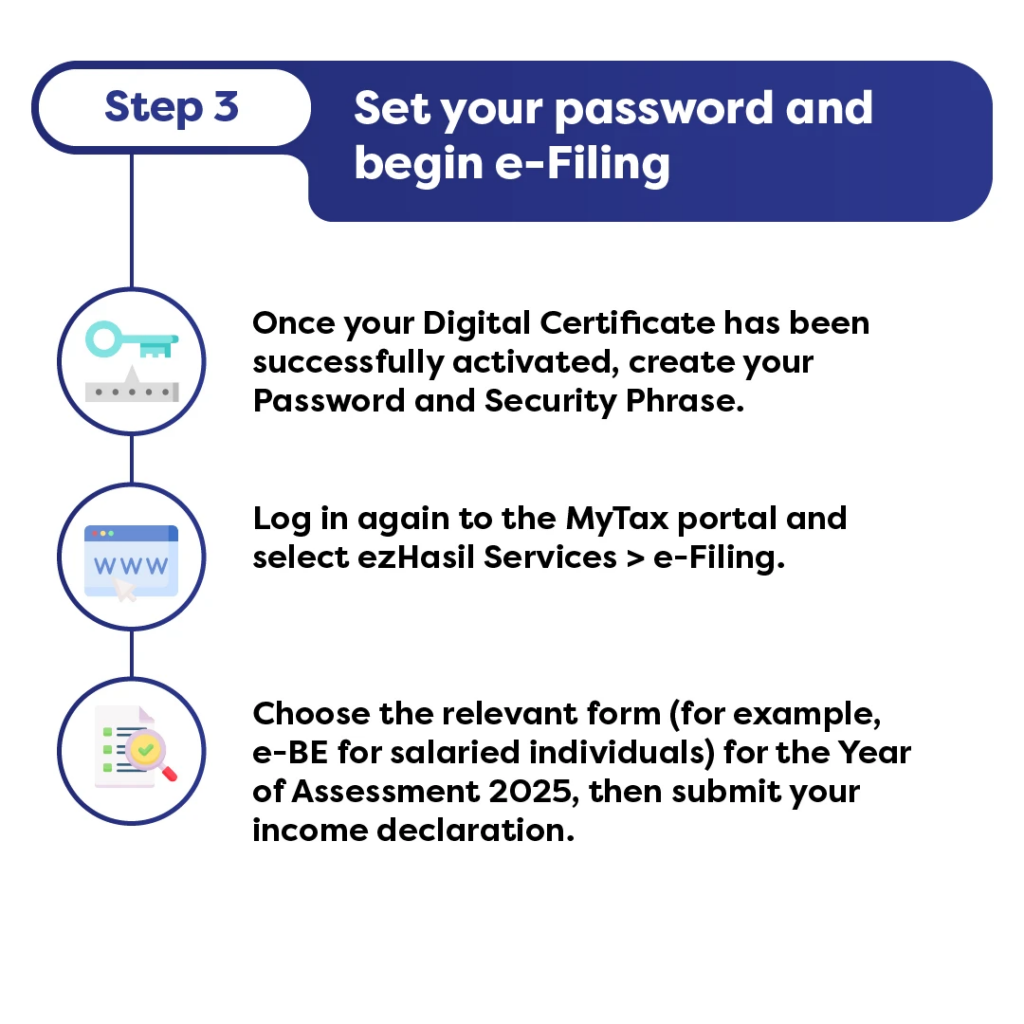
Once your account is activated, log in and start filing your income tax
1. Navigate to e-Filing
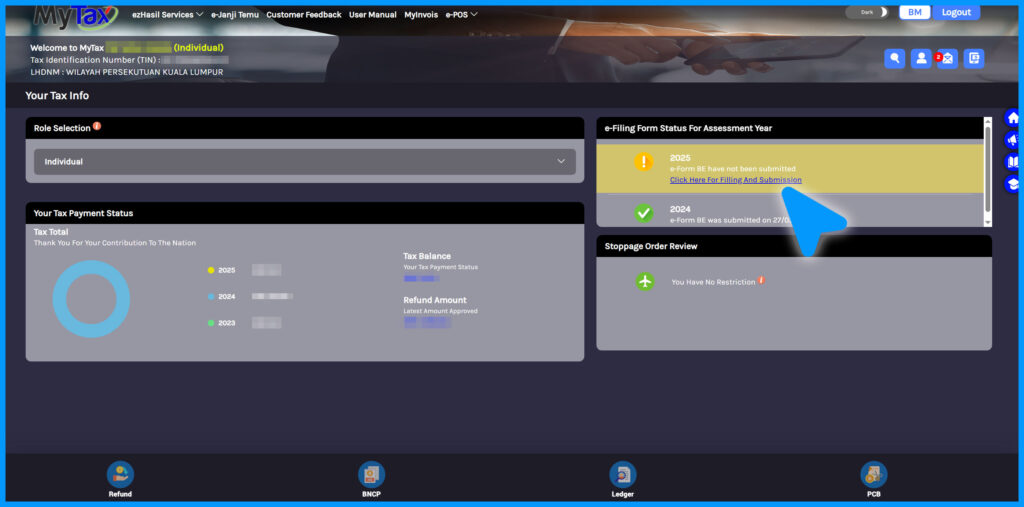
Inside the MyTax portal, find the 'e-Filing' section and select '2025' to file your income tax for the previous year.
As mentioned earlier, this guide is for Malaysian salaried employees, so we will select e-BE in this step, which stands for 'individual without business source of income'.
If you are not a Malaysian salaried employee (for example, you have a side business or work freelance), select the option that applies to you.
2. Provide your particulars before clicking 'Next'
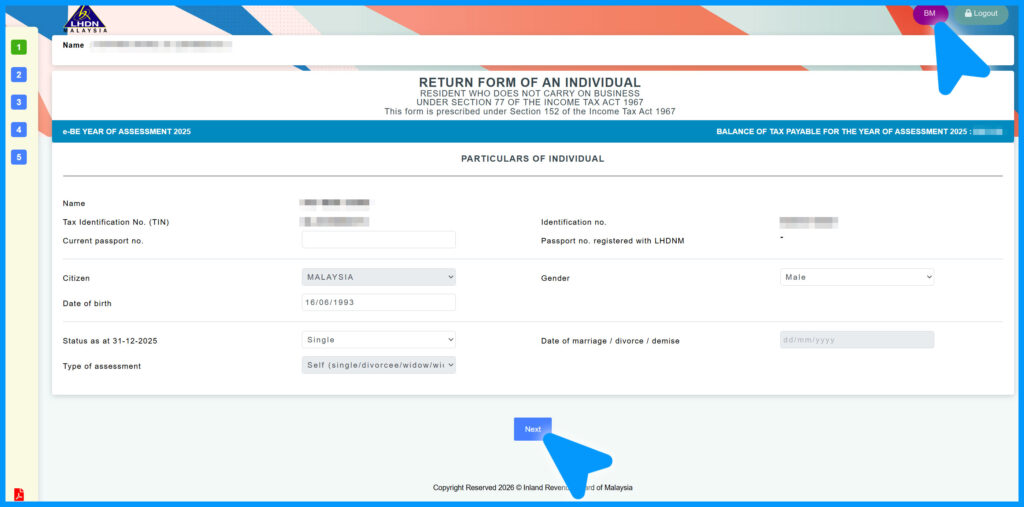
Remember, you can always toggle the language of the page by clicking 'BM' or 'EN' found on the top right corner.
Fill in your current passport number and your current marital status. The latter is important as married individuals with or without children have a higher taxable income threshold.
The 'Separate' selection is for couples who wish to submit two separate income tax filings, while the 'Joint' selection is for those who want to combine their incomes in a single filing.
It is advised to always opt for a separate assessment if both spouses draw high annual incomes, as it allows both partners to maximise individual tax reliefs.
A joint assessment is typically better only if one spouse has low or no income, which will allow the higher-earning spouse to claim a RM4,000 spouse tax relief.
Below is the threshold of an individual's non-taxable income according to the type of assessment:
| Type of Assessment | Annual Income (RM) | Monthly Income (RM) |
|---|---|---|
| Self (single/widower/divorcee/spouse with no source of income) | 37,333 | 3,111 |
| Separately | ||
| 1. Married with no child | 37,333 | 3,111 |
| 2. Married with 1 child | – | – |
| 3. Married with 2 children | 41,333 | 3,444 |
| Joint | ||
| 1. Married with no child | 48,000 | 4,000 |
| 2. Married with 1 child | 50,000 | 4,167 |
| 3. Married with 2 children | 52,000 | 4,333 |
Once all information in this first section is accurate, click 'Next' to move on to the 'Other Particulars' section.
3. Fill in your bank account and other details
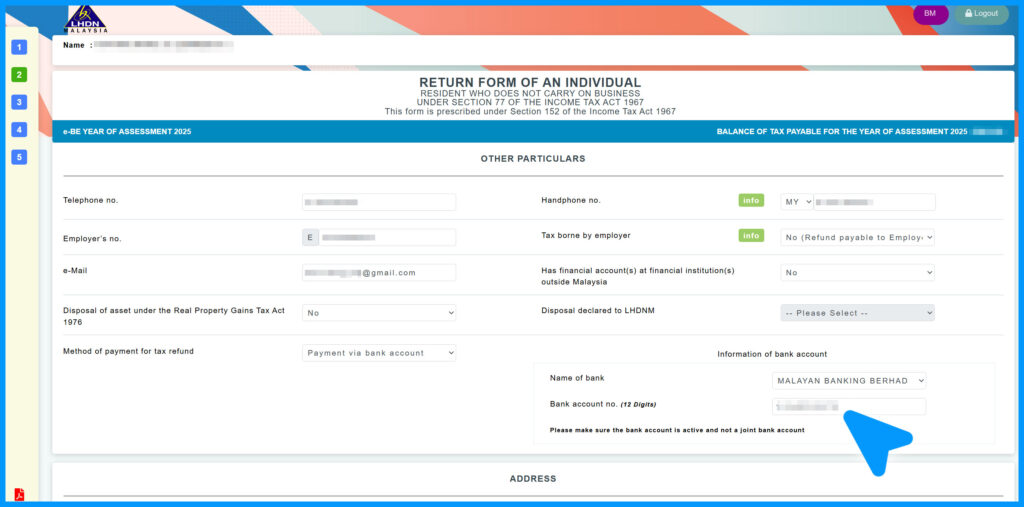
There are four different sections for you to fill out in this e-BE form.
If you have trouble understanding what some columns are requesting, you can click 'BE explanatory notes' found at the bottom left of the screen. They will provide all the information you need to know.
In this section, you will be asked to fill in the name of your bank and the account number. This is so LHDN can reimburse any tax refunds after your submission.
Once you are done filling in your particulars, proceed to the next section by clicking 'Next' or '3' on the left menu.
Also note that if you stay idle on this page, you will be logged out automatically. However, all of your input will be saved. You can always access where you left off by clicking the 2025 assessment year on your MyTax logged-in page.
4. Declare your income
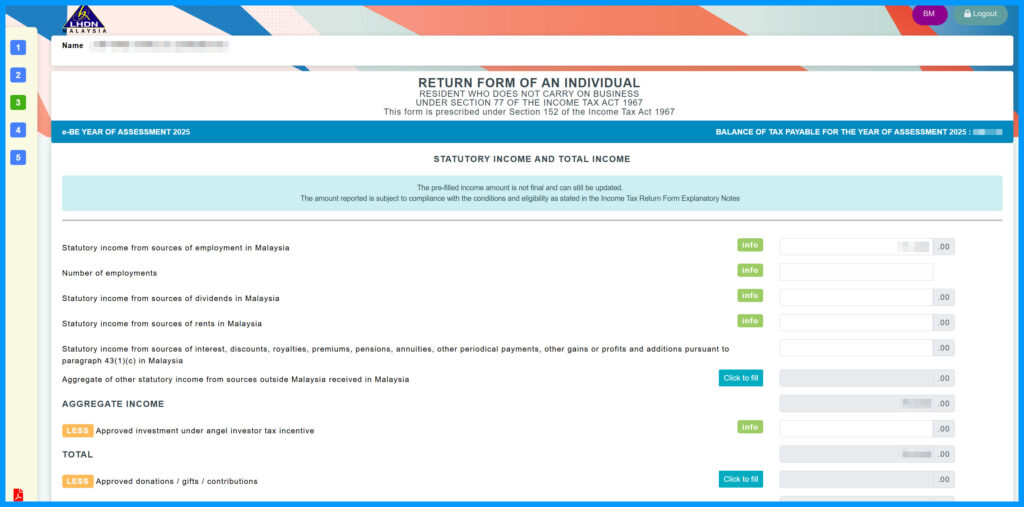
Refer to your previous year's EA form(s) and fill in your total annual income.
Below is the table of the income tax bracket found on the LHDN website:
| Category | Chargeable Income | Calculations (RM) | Rate % | Tax (RM) |
|---|---|---|---|---|
| A | 0 – 5,000 | On the First 5,000 | 0 | 0 |
| B | 5,001 – 20,000 | On the First 5,000 Next 15,000 |
1 | 0 150 |
| C | 20,001 – 35,000 | On the First 20,000 Next 15,000 |
3 | 150 450 |
| D | 35,001 – 50,000 | On the First 35,000 Next 15,000 |
6 | 600 900 |
| E | 50,001 – 70,000 | On the First 50,000 Next 20,000 |
11 | 1,500 2,200 |
| F | 70,001 – 100,000 | On the First 70,000 Next 30,000 |
19 | 3,700 5,700 |
| G | 100,001 – 400,000 | On the First 100,000 Next 300,000 |
25 | 9,400 75,000 |
| H | 400,001 – 600,000 | On the First 400,000 Next 200,000 |
26 | 84,400 52,000 |
| I | 600,001 – 2,000,000 | On the First 600,000 Next 1,400,000 |
28 | 136,400 392,000 |
| J | Exceeding 2,000,000 | On the First 2,000,000 Next ringgit |
30 | 528,400 |
5. Claim your reliefs
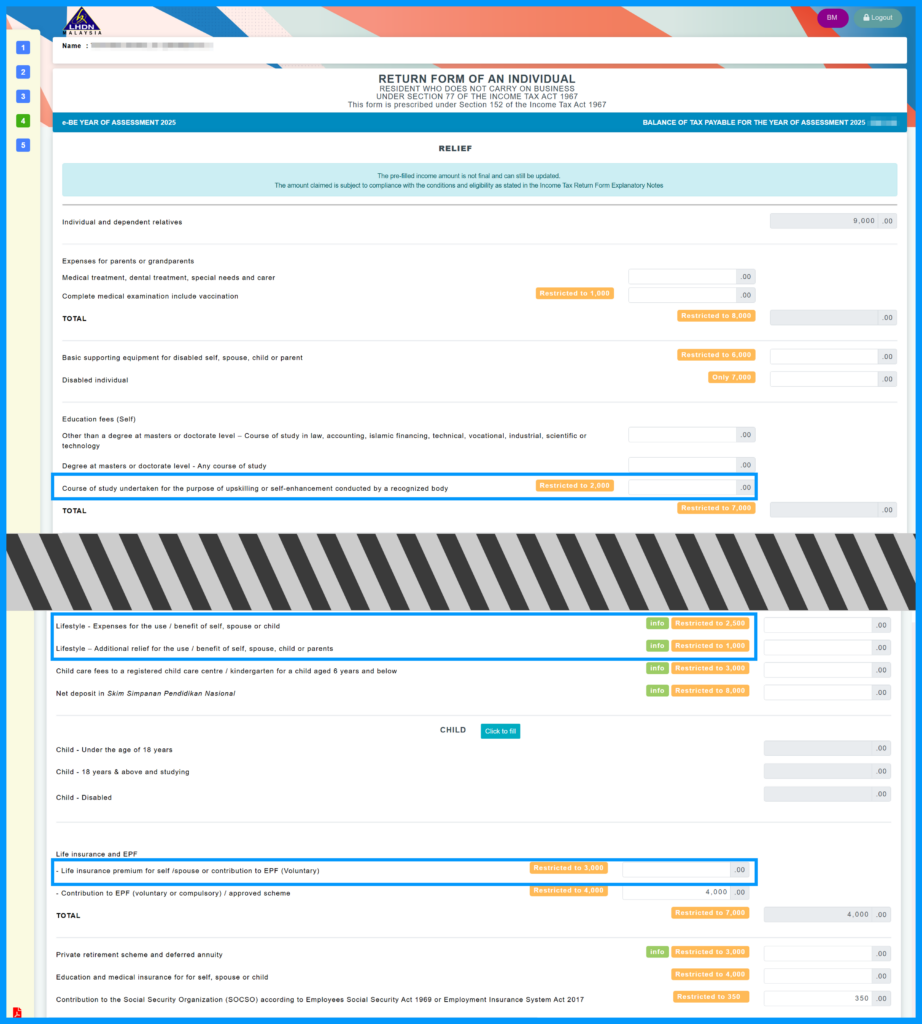
While there are many tax relief options available, this guide highlights four popular 'individual tax relief types' since many first-time taxpayers fall under the lower tax brackets.
If you have kept the receipts for computer, smartphone, and book purchases, as well as bills for Internet subscriptions, they all fall under the 'lifestyle' tax relief. This category allows up to a RM2,500 tax relief.
Purchases of sports equipment, gym membership fees, or rental or entrance fees to sports facilities also fall under a separate sports-related lifestyle relief. You can claim up to RM1,000 in this 'Lifestyle – Additional Relief' category.
Additionally, if you have life, education, or medical insurance, you can claim the premiums. There is a RM7,000 cap across two categories.
If the categories above don't cover your payable tax, take a look at your EA form and key in the amount you paid for SOCSO. You can claim up to RM250 in this category.
For the full tax relief list, you can read this SAYS article here.
So quickly dig through your emails and find all the electronic invoices. All these bills you have been paying for are finally useful.
Note: If you are confused about why you are still paying taxes despite claiming, for example, RM4,000 for medical insurance — an amount higher than the tax you owe — it is important to understand that the RM4,000 is not a direct deduction from your payable tax, but from your taxable income, i.e. your total annual income.
6. Check the total tax payable or tax return
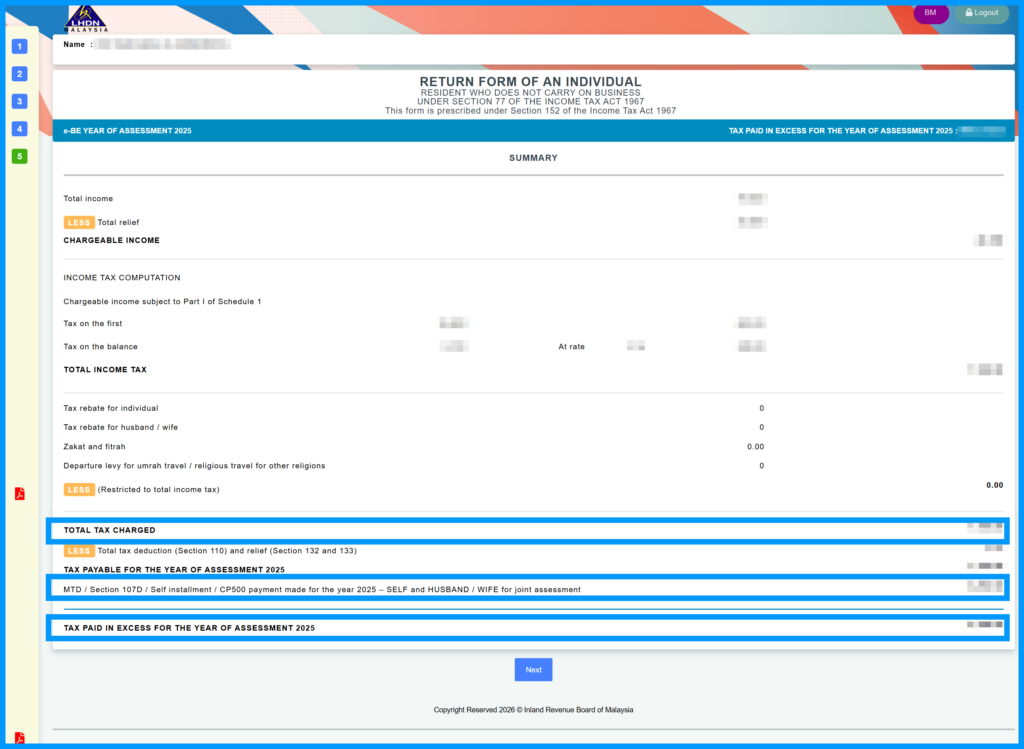
The first blue box in the screenshot shows the amount of tax charged, while the second blue box shows the monthly tax deductions (MTD/PCB) you have paid.
The third blue box shows the excess tax you have paid for the year. This is the amount that will be returned to your bank account.
Once you are done, click 'Next'.
The final step is to declare that all the information provided is true. Then, click the button at the bottom of the page to electronically sign the form and submit your e-BE form to LHDN. Click the 'Print' button to save a PDF version of your submission.
Voilà, you are done!
Here are more stories related to income tax on SAYS:

Social Media Influencers: What You Need To Know About The New LHDN Rules And How They Affect You
From YouTube payouts to Instagram gifts, here's what LHDN says is taxable, and which expenses can be claimed.