
You Can Finally Change The Song On Your Instagram Posts After Posting Them
No more deleting and reuploading just because you picked the wrong track.


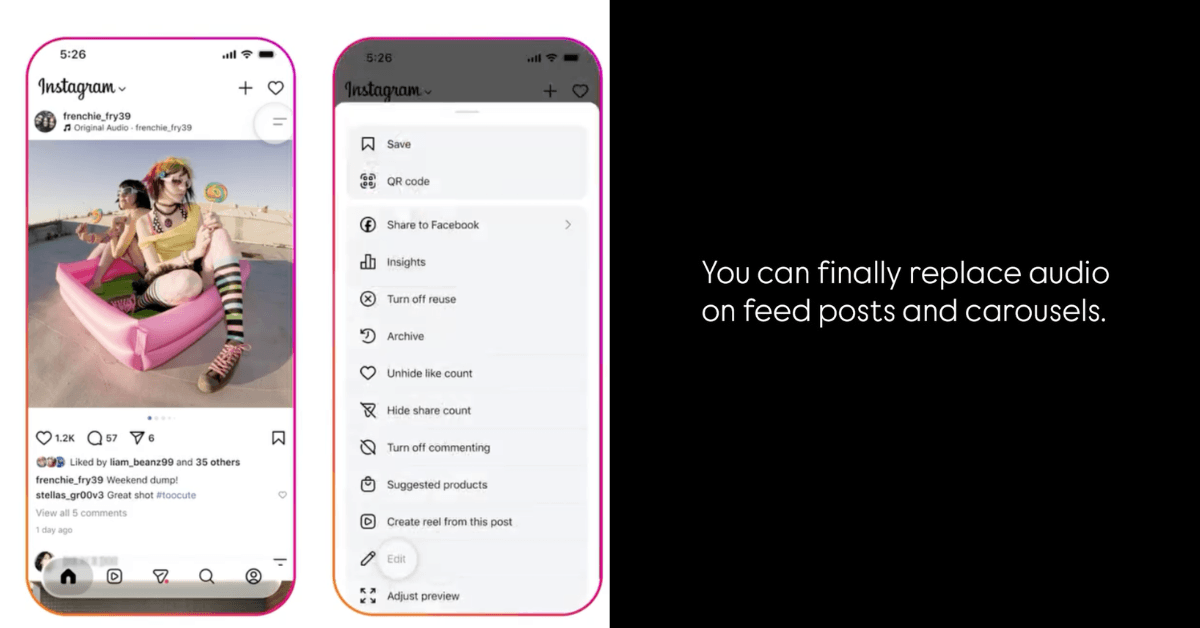 Cover image via
 Follow us on Instagram, TikTok, and WhatsApp for the latest stories and breaking news.
Instagram has finally rolled out a feature that many users have been asking for — the ability to change the music on a post even after it has been published
Previously, if you regretted your song choice or wanted to switch to a trending audio, your only option was to delete the post and upload it again, losing all your likes, comments, and shares in the process.
That's no longer the case.
The new Replace Audio feature lets you change the soundtrack on existing photo posts and carousels without having to re-upload them
Better yet, your post will keep all of its existing engagement, including likes, comments, shares, and reach.
According to Instagram, the feature gives creators more flexibility by allowing them to update older posts with a different song whenever they want.
Whether you accidentally picked the wrong track, found a song that better matches the vibe, or simply want to refresh an old post with a trending audio, you can now do it in just a few taps.

Here's how to change the music on a post
- Open the Instagram post you want to edit
- Tap the two-line menu in the top right corner
- Select Edit
- Tap Replace Audio
- Choose a new song from Instagram's music library and save your changes
The feature currently works for feed posts and photo carousels.
Great news for anyone who's ever regretted a song choice
It's also handy for creators and brands who want to refresh older content with trending songs without sacrificing the performance the post has already built up.
